-


常用软件
站-
热门城市 全国站>
-
其他省市
-
-

 400-808-3611
 小标
2018-04-25
来源 :
阅读 4031
评论 0
小标
2018-04-25
来源 :
阅读 4031
评论 0
摘要:使用Adobe Text Engine进行Illustrator插件开发,是很重要的一部分,本文通过具体的解释说明,让我们从中学到如何进行Illustrator插件开发,让我们在今后学习和使用的时候能够更加熟练的运用它们,从而便于更好的操作。
使用Adobe Text Engine进行Illustrator插件开发
使用Adobe Text Engine进行Illustrator插件开发,是很重要的一部分,本文通过具体的解释说明,让我们从中学到如何进行Illustrator插件开发,让我们在今后学习和使用的时候能够更加熟练的运用它们,从而便于更好的操作。
Adobe text engine提供了Illustrator中强大的文本支持,主要的特点有:
1. unicode
2. OpenType
3. 先进的排版技术,如字距、边缘对齐、自动的字形替换、字形比例。
4. 文本和段落样式
5. 亚洲文字
下面就是一些使用ATE的方法。
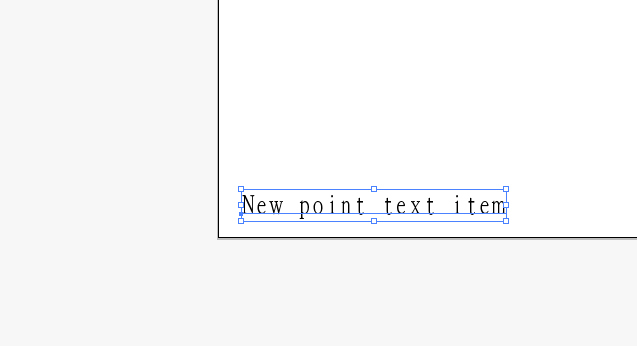
创建point text:
[cpp] view plain copy
1. ASErr SnpText::CreatePointText()
2. {
3.     ASErr result = kNoErr;
4.     try {
5.         // Get the group art that contains all the art in the current layer.
6.         AIArtHandle artGroup = NULL;
7.         result = sAIArt->GetFirstArtOfLayer(NULL, &artGroup);
8.         aisdk::check_ai_error(result);
9.
10.
11.         // Add the new point text item to the layer. 添加point text
12.         AITextOrientation orient = kHorizontalTextOrientation;
13.         AIRealPoint anchor = {10,10};
14.         AIArtHandle textFrame = NULL;
15.         result = sAITextFrame->NewPointText(kPlaceAboveAll, artGroup, orient, anchor, &textFrame);
16.         aisdk::check_ai_error(result);
17.
18.
19.         // Set the contents of the text range. 改变内容
20.         TextRangeRef range = NULL;
21.         result = sAITextFrame->GetATETextRange(textFrame, &range);
22.         aisdk::check_ai_error(result);
23.         ITextRange crange(range);
24.         crange.InsertAfter("New point text item");
25.     }
26.     catch (ai::Error& ex) {
27.         result = ex;
28.     }
29.     catch (ATE::Exception& ex) {
30.         result = ex.error;
31.     }
32.     return result;
33. } 
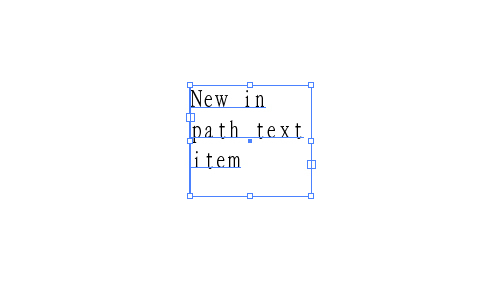
创建In path text:
[cpp] view plain copy
1. ASErr SnpText::CreateInPathText()
2. {
3.     ASErr result = kNoErr;
4.     try {
5.         // Get the group art that contains all the art in the current layer. 获取组art
6.         AIArtHandle artGroup = NULL;
7.         result = sAIArt->GetFirstArtOfLayer(NULL, &artGroup);
8.         aisdk::check_ai_error(result);
9.
10.         // Add the new in path text item to the layer.
11.         AIArtHandle textFrame;
12.         sAIArt->GetArtFirstChild(artGroup, &textFrame); // 我先创建了一个矩形矿,这里是获取这个矩形框
13.         aisdk::check_ai_error(result);
14.         AITextOrientation orient = kHorizontalTextOrientation;
15.         result = sAITextFrame->NewInPathText(kPlaceAboveAll, artGroup, orient, textFrame, NULL, false, &textFrame);
16.         aisdk::check_ai_error(result);
17.
18.         // Set the contents of the text range. 改变内容
19.         TextRangeRef range = NULL;
20.         result = sAITextFrame->GetATETextRange(textFrame, &range);
21.         aisdk::check_ai_error(result);
22.         ITextRange iTextRange(range);
23.         iTextRange.InsertAfter("New in path text item");
24.     }
25.     catch (ai::Error& ex) {
26.         result = ex;
27.     }
28.     catch (ATE::Exception& ex) {
29.         result = ex.error;
30.     }
31.     return result;
32. } 
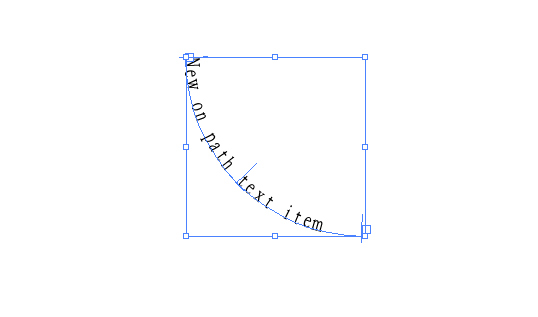
创建on path text:
[cpp] view plain copy
1. ASErr SnpText::CreateOnPathText()
2. {
3.     ASErr result = kNoErr;
4.     try {
5.         // Get the group art that contains all the art in the current layer.
6.         AIArtHandle artGroup = NULL;
7.         result = sAIArt->GetFirstArtOfLayer(NULL, &artGroup);
8.         aisdk::check_ai_error(result);
9.
10.         // Add the new on path text item to the layer.
11.         AITextOrientation orient = kHorizontalTextOrientation;
12.         AIArtHandle<span style="white-space:pre;">  </span>textPath;
13. <span style="white-space:pre;">     </span>sAIArt->GetArtFirstChild(artGroup, &textPath); // 先创建了一个圆弧,这里是获取这个圆弧
14.         aisdk::check_ai_error(result);
15.         result = sAITextFrame->NewOnPathText(kPlaceAboveAll, artGroup, orient, textPath, 0, 0, NULL, false, &textPath);
16.         aisdk::check_ai_error(result);
17.
18.         // Set the contents of the text range.
19.         TextRangeRef range = NULL;
20.         result = sAITextFrame->GetATETextRange(textPath, &range);
21.         aisdk::check_ai_error(result);
22.         ITextRange iTextRange(range);
23.         iTextRange.InsertAfter("New on path text item");
24.     }
25.     catch (ai::Error& ex) {
26.         result = ex;
27.     }
28.     catch (ATE::Exception& ex) {
29.         result = ex.error;
30.     }
31.     return result;
32. } 
本文由职坐标整理并发布,希望对同学们有所帮助。了解更多详情请关注常用软件Illustrator频道!
 喜欢 | 1
 不喜欢 | 0





您输入的评论内容中包含违禁敏感词
我知道了

请输入正确的手机号码
请输入正确的验证码
您今天的短信下发次数太多了,明天再试试吧!
我们会在第一时间安排职业规划师联系您!
您也可以联系我们的职业规划师咨询:

版权所有 职坐标-一站式AI+学习就业服务平台 沪ICP备13042190号-4
上海海同信息科技有限公司 Copyright ©2015 www.zhizuobiao.com,All Rights Reserved.
 沪公网安备 31011502005948号







 资料领取
资料领取

 答疑解惑
答疑解惑

 技术交流
技术交流

 职业测评
职业测评

 面试技巧
面试技巧

 高薪秘笈
高薪秘笈